What is Windows 11 Pro 26H1 Build 28000.1199
- Build 28000.1199 belongs to Windows 11, version 26H1, released via the Canary Channel of the Windows Insider Program.
- The “26H1” update is not designed as a regular “feature update” like previous Windows-11 updates (e.g. 22H2, 23H2, 24H2, 25H2). Instead, 26H1 is a platform-level release, with the primary purpose of enabling support for next-generation hardware (especially upcoming ARM-based silicon).
- Build 28000.1199 (released November 18, 2025) is a continuation of this platform branch — essentially a refinement build for 26H1.
- In short: this build is a “foundation update” — under-the-hood infrastructure work — not a collection of new user-facing features.
Key Purpose & Design Goals (What this build is for)
- Hardware enablement for next-gen silicon: 26H1 (and build 28000.x) is aimed at supporting forthcoming ARM-based processors (rumoured examples: ARM chips like Snapdragon X2 and NVIDIA N1X).
- Platform baseline reset: Internally, this build uses a new core platform (codenamed “Bromine”), distinct from the previous “Germanium” base used in 24H2/25H2. This gives Microsoft and OEMs a clean slate to build future hardware and driver support.
- Testing & validation environment: By publishing on the Canary Channel, Microsoft can test kernel changes, scheduler updates, driver stack improvements, and compatibility with new silicon — without disturbing mainstream users.
What’s New (in Build 28000.1199 / 26H1) — and What Changed
Because 26H1 is a platform-only build, most changes are “under the hood.” According to official and community sources:
✅ What’s new / updated
- Build 28000.1199 continues with “a small set of general improvements and fixes” aimed at stability and reliability for testers running the build.
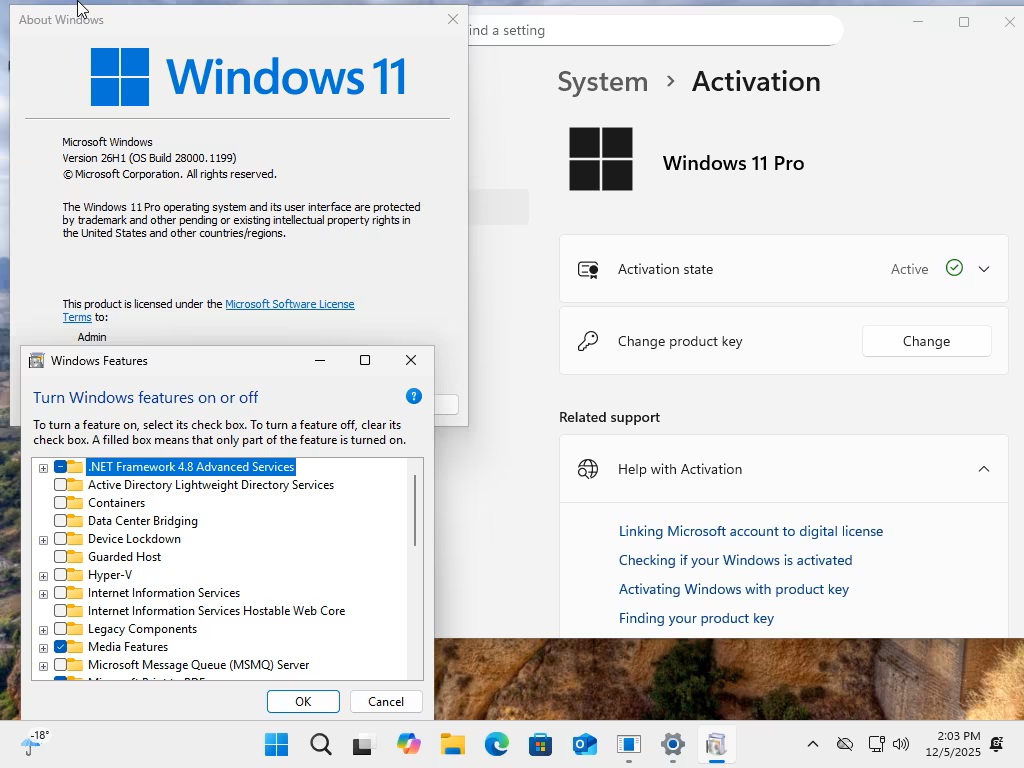
- The version string under Settings → About (and
winver) is updated to “Windows 11, version 26H1.” - The platform changes potentially prep the OS for compatibility with new silicon (ARM-based chips) — kernel, driver stack, scheduler, low-level OS plumbing adjusted accordingly.
⚠ What is not part of this build (i.e. what’s unchanged / absent)
- This is not a feature update: no major UI changes, no new consumer-facing features (no new design elements, no new built-in apps, no big productivity enhancements).
- For most existing PCs (especially standard Intel/AMD machines), there is effectively no visible difference compared to Windows 11 25H2.
- Microsoft has explicitly stated that “Windows 11 version 25H2 remains the primary place for new features.”
What Was Removed or Deprecated — or Rather: Nothing Substantially Removed
Because 26H1 is not a “lite” build or custom stripped-down distribution, but an official platform update from Microsoft:
- There is no evidence that any core Windows 11 features were removed or disabled in Build 28000.1199. It retains the full Windows 11 Pro functionality as before.
- This build is not about “debloating,” trimming, or disabling Windows components — so you should not expect removals like in some custom “lite” distributions.
In short: this build is additive (under-the-hood) — not subtractive.
Who Is 26H1 / Build 28000.1199 For?
This build makes sense mainly for:
- OEMs and hardware manufacturers, especially those preparing devices with upcoming ARM-based silicon (e.g. Snapdragon X2, NVIDIA N1X). They need the platform-level changes to ensure Windows will run properly.
- Insider testers, developers, hardware partners, who want early access to OS-level changes, to test compatibility, drivers, and platforms.
- Advanced users curious about future Windows builds — but only if they are okay with using a Canary-channel build (which may be unstable).
For typical everyday users on existing hardware (Intel / AMD), there’s no compelling reason to upgrade — because functionality and UX remain identical to version 25H2 for now.
What to Expect in the Future (What This Build Enables)
Because 26H1 is a foundational build, the real “visible” features are expected in future updates (e.g. version 26H2 or later). 26H1 lays the groundwork for:
- Support of new generation ARM-based PCs and silicon, bringing Windows to newer hardware platforms.
- Better driver, kernel, scheduler, and low-level OS plumbing, which may allow improved performance, power, and stability on future hardware.
- A smooth transition path for Microsoft & OEMs to build “Copilot+” or “Next-Gen Windows PCs” without disrupting existing Windows 11 servicing channels.